
No Asteroids: Post-Contract Jobs
After the main contract finishes, use Next Contract and review the client offers on the Bridge. Compare listed volume, makeup, pieces and reward before accepting. To work with your existing gear, take a contract in the same year and leave Skip 1 year for a separate reset.
Open a client offer on the Bridge
Finish the original contract and advance from its completion screen with Next Contract. The Bridge offers new asteroids from other clients. Read the material and size fields together: a small thick core may take different gear from a broader, weaker shape.
For example, the documented board lists The Ten as a ten-piece swarm and Big Guy as a single 10,000,000 m³ core job. If you want a straightforward cleanup route, check the number of pieces before accepting a swarm.
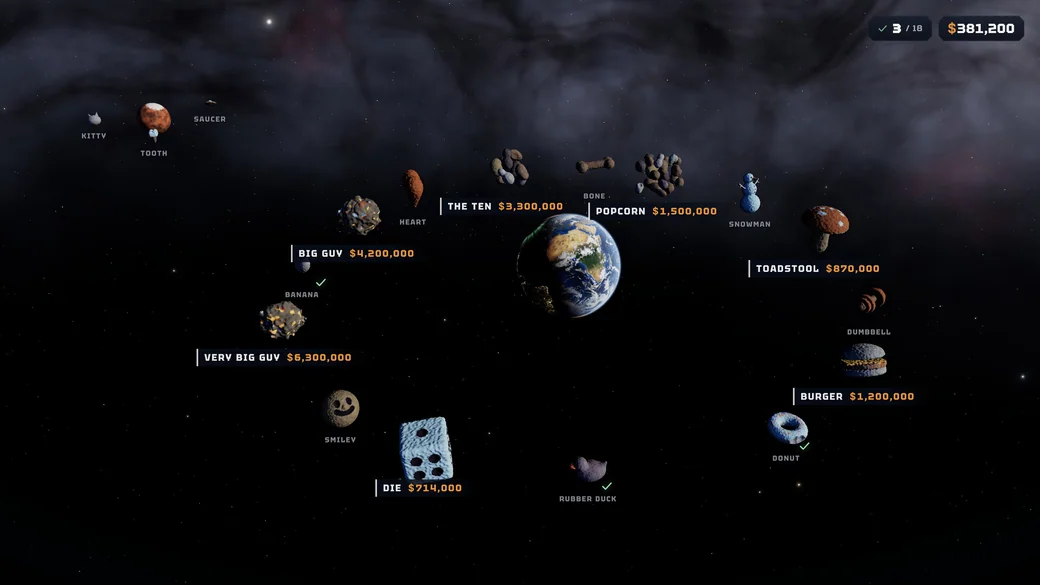
Check the job payout and mark the shape complete
The documented contract dataset lists payout against the asteroid’s material and volume. Take the current offer’s displayed reward as your quote. Compare it with the time and equipment the shape needs instead of treating the listed volume alone as the best deal.
Clear the selected rock to finish its job. November 25 patch notes say completed shapes are marked on the sector map and uncompleted shapes are offered first. Steam’s Overtime records taking a contract on a new asteroid after the ending.