
No Asteroids: Selling Ore and Making Money
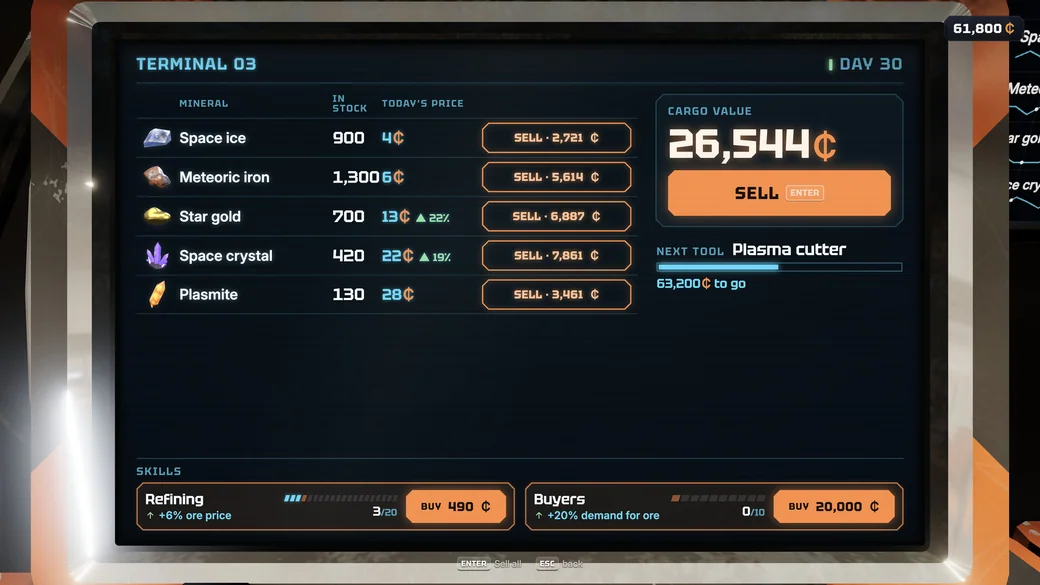
After docking, sell your delivered haul at the Trade Terminal near the lander. Use the quoted total for the full sale when budgeting an upgrade. A large stack can depress the unit price during that same sale, so the visible starting price may overstate what you will receive.
Steam release notes through the November 25 changes. The dollar amounts are in-game.
Read the sale screen in the Hangar
After the lander returns, walk to the Trade Terminal. Check the listed quantities and the full quoted payout, then use the on-screen Sell prompt. The documented default keyboard prompt is Enter. Confirm that the wallet moves and that the sold stock clears from the terminal.
If the expected ore is missing, check whether it was still on you when you blacked out. Ore recovered into the ship by the Tractor Beam is a different stock from loose pieces drifting near the rock.
Account for market glut and spare rock
Check the payout before holding up a purchase for a better price. The November 25 Gear update reduced the loss on large sales and sped up overnight recovery. There is still a trade-off: waiting can improve price, but a missing upgrade costs you the output of the next shift.
From Day 35 in Update 1.0.2, spare cargo space can take mined rock at $2 per unit. It is supplemental income when the mineral load leaves room. Refining and Buyers affect the mineral economy, so budget ordinary rock separately.
Check campaign and crew modifiers before spending
The November 21 notes set multiplayer ore sales to 90% of normal and introduced a separate 90% ore-income setting for newly created Hard campaigns. They do not settle every combined-save calculation. Read the displayed sale total on your active run.
The crew spends from a shared wallet. Before you plan a Laser, Plasma cutter or Missile swarm purchase, check gear mode and the card price. Keep enough balance for the upgrade that changes your next haul or the ship mount that actually changes your pace.